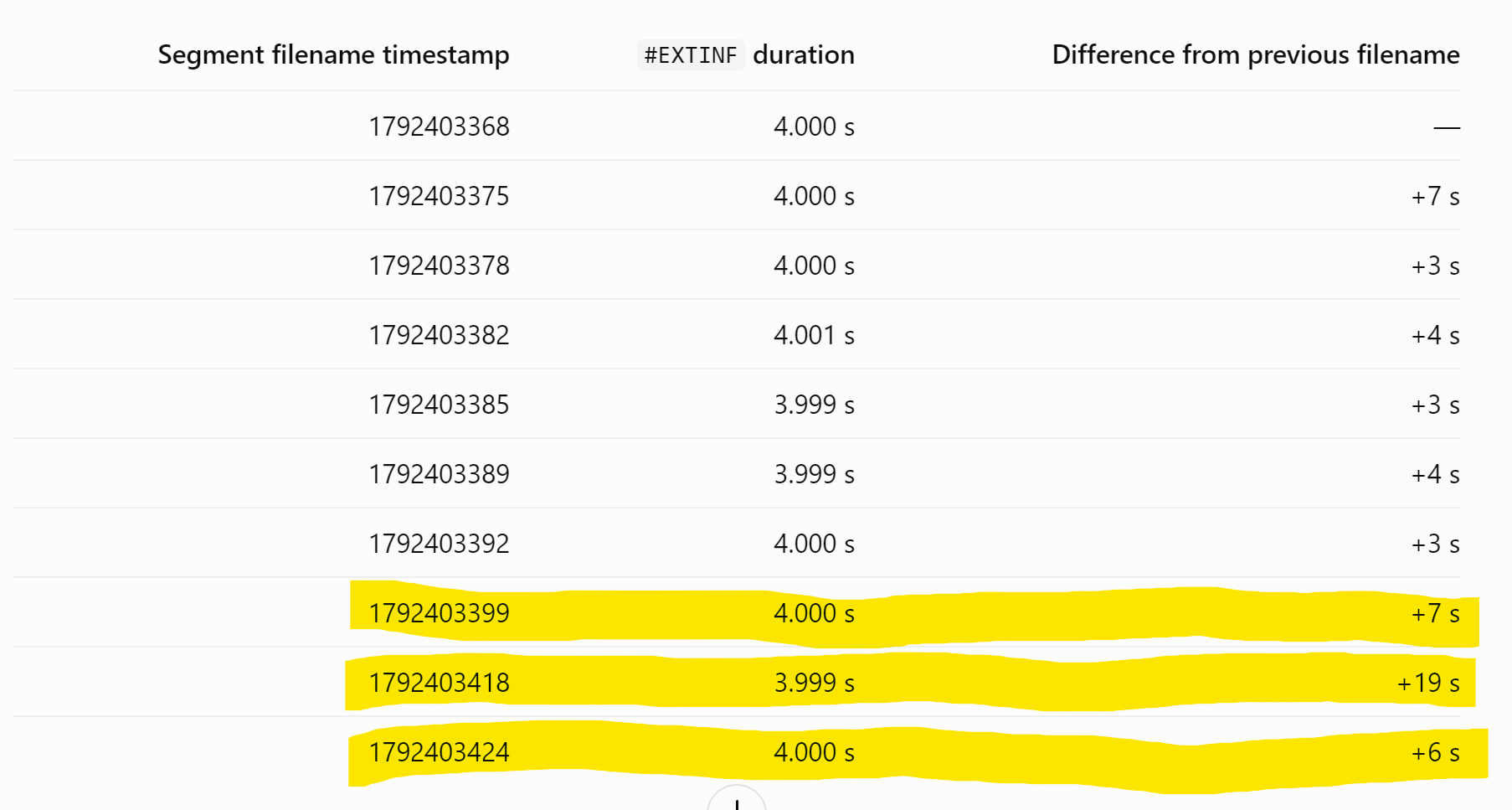
So I found the error. Now it is getting a bit technical…
To rule out any network problem on our side as well as more important also on the side of VHTV I downloaded the chunk before and after the jump.
- Before Chunk: cam14_hi-1792403399.ts
- After Chunk: cam14_hi-1792403424.ts
At first we need to look at the internal timestamps. We start with the before chunk:
PS P:\Analyze> ffprobe -v error -show_entries format=start_time,duration -show_entries stream=codec_type,start_time,duration -of json before.ts
{
    "programs": [
        {
            "streams": [
                {
                    "codec_type": "video",
                    "start_time": "6699.763000",
                    "duration": "4.000000"
                },
                {
                    "codec_type": "audio",
                    "start_time": "6699.734000",
                    "duration": "3.584000"
                }
            ]
        }
    ],
    "stream_groups": [

    ],
    "streams": [
        {
            "codec_type": "video",
            "start_time": "6699.763000",
            "duration": "4.000000"
        },
        {
            "codec_type": "audio",
            "start_time": "6699.734000",
            "duration": "3.584000"
        }
    ],
    "format": {
        "start_time": "6699.734000",
        "duration": "4.029000"
    }
}
A json is returned showing us the start time of the before chunk (6699.763000)
We now add the duration (4 seconds) And get the end time. (Which should also be the starting time of the next chunk. End time: 6703.763000
Now we do the same with the after chunk:
PS P:\Analyze> ffprobe -v error -show_entries format=start_time,duration -show_entries stream=codec_type,start_time,duration -of json after.ts
{
    "programs": [
        {
            "streams": [
                {
                    "codec_type": "video",
                    "start_time": "6719.763000",
                    "duration": "3.999000"
                },
                {
                    "codec_type": "audio",
                    "start_time": "6719.702000",
                    "duration": "3.584000"
                }
            ]
        }
    ],
    "stream_groups": [

    ],
    "streams": [
        {
            "codec_type": "video",
            "start_time": "6719.763000",
            "duration": "3.999000"
        },
        {
            "codec_type": "audio",
            "start_time": "6719.702000",
            "duration": "3.584000"
        }
    ],
    "format": {
        "start_time": "6719.702000",
        "duration": "4.060000"
    }
}
Again we get a json showing us the start time: 6719.76300. Our expected start time however is 6703.763000
This makes a difference of exact 16 seconds We know that one chunk is exactly 4 seconds. So exactly 4 chunks are missing here (This is our jump)
But we are not done yet. We need to rule out that certain delays in the spacing of the video frames might cause such a delay. So we need to look into that as well
The before chunk is sufficient here as the playback of the after chunk is not important as the jump at this time already happened:
PS P:\Analyze> ffprobe -v error -select_streams v:0 -show_packets -show_entries packet=pts_time,dts_time,duration_time,flags -of csv=p=0 before.ts
6699.763000,6699.763000,0.040000,K__,MPEGTS Stream ID,224
6699.803000,6699.803000,0.040000,___,MPEGTS Stream ID,224
6699.843000,6699.843000,0.040000,___,MPEGTS Stream ID,224
6699.883000,6699.883000,0.040000,___,MPEGTS Stream ID,224
6699.923000,6699.923000,0.040000,___,MPEGTS Stream ID,224
6699.963000,6699.963000,0.040000,___,MPEGTS Stream ID,224
6700.003000,6700.003000,0.040000,___,MPEGTS Stream ID,224
6700.043000,6700.043000,0.040000,___,MPEGTS Stream ID,224
6700.083000,6700.083000,0.040000,___,MPEGTS Stream ID,224
6700.123000,6700.123000,0.040000,___,MPEGTS Stream ID,224
6700.163000,6700.163000,0.040000,___,MPEGTS Stream ID,224
6700.203000,6700.203000,0.040000,___,MPEGTS Stream ID,224
6700.243000,6700.243000,0.040000,___,MPEGTS Stream ID,224
6700.283000,6700.283000,0.040000,___,MPEGTS Stream ID,224
6700.323000,6700.323000,0.040000,___,MPEGTS Stream ID,224
6700.363000,6700.363000,0.040000,___,MPEGTS Stream ID,224
6700.403000,6700.403000,0.040000,___,MPEGTS Stream ID,224
6700.443000,6700.443000,0.040000,___,MPEGTS Stream ID,224
6700.483000,6700.483000,0.040000,___,MPEGTS Stream ID,224
6700.523000,6700.523000,0.040000,___,MPEGTS Stream ID,224
6700.563000,6700.563000,0.040000,___,MPEGTS Stream ID,224
6700.603000,6700.603000,0.040000,___,MPEGTS Stream ID,224
6700.643000,6700.643000,0.040000,___,MPEGTS Stream ID,224
6700.683000,6700.683000,0.040000,___,MPEGTS Stream ID,224
6700.723000,6700.723000,0.040000,___,MPEGTS Stream ID,224
6700.763000,6700.763000,0.040000,___,MPEGTS Stream ID,224
6700.803000,6700.803000,0.040000,___,MPEGTS Stream ID,224
6700.843000,6700.843000,0.040000,___,MPEGTS Stream ID,224
6700.883000,6700.883000,0.040000,___,MPEGTS Stream ID,224
6700.923000,6700.923000,0.040000,___,MPEGTS Stream ID,224
6700.963000,6700.963000,0.040000,___,MPEGTS Stream ID,224
6701.003000,6701.003000,0.040000,___,MPEGTS Stream ID,224
6701.043000,6701.043000,0.040000,___,MPEGTS Stream ID,224
6701.083000,6701.083000,0.040000,___,MPEGTS Stream ID,224
6701.123000,6701.123000,0.040000,___,MPEGTS Stream ID,224
6701.163000,6701.163000,0.040000,___,MPEGTS Stream ID,224
6701.203000,6701.203000,0.040000,___,MPEGTS Stream ID,224
6701.243000,6701.243000,0.040000,___,MPEGTS Stream ID,224
6701.283000,6701.283000,0.040000,___,MPEGTS Stream ID,224
6701.323000,6701.323000,0.040000,___,MPEGTS Stream ID,224
6701.363000,6701.363000,0.040000,___,MPEGTS Stream ID,224
6701.403000,6701.403000,0.040000,___,MPEGTS Stream ID,224
6701.443000,6701.443000,0.040000,___,MPEGTS Stream ID,224
6701.483000,6701.483000,0.040000,___,MPEGTS Stream ID,224
6701.523000,6701.523000,0.040000,___,MPEGTS Stream ID,224
6701.563000,6701.563000,0.040000,___,MPEGTS Stream ID,224
6701.603000,6701.603000,0.040000,___,MPEGTS Stream ID,224
6701.643000,6701.643000,0.040000,___,MPEGTS Stream ID,224
6701.683000,6701.683000,0.040000,___,MPEGTS Stream ID,224
6701.723000,6701.723000,0.040000,___,MPEGTS Stream ID,224
6701.763000,6701.763000,0.040000,___,MPEGTS Stream ID,224
6701.803000,6701.803000,0.040000,___,MPEGTS Stream ID,224
6701.843000,6701.843000,0.040000,___,MPEGTS Stream ID,224
6701.883000,6701.883000,0.040000,___,MPEGTS Stream ID,224
6701.923000,6701.923000,0.040000,___,MPEGTS Stream ID,224
6701.963000,6701.963000,0.040000,___,MPEGTS Stream ID,224
6702.003000,6702.003000,0.040000,___,MPEGTS Stream ID,224
6702.043000,6702.043000,0.040000,___,MPEGTS Stream ID,224
6702.083000,6702.083000,0.040000,___,MPEGTS Stream ID,224
6702.123000,6702.123000,0.040000,___,MPEGTS Stream ID,224
6702.163000,6702.163000,0.040000,___,MPEGTS Stream ID,224
6702.203000,6702.203000,0.040000,___,MPEGTS Stream ID,224
6702.243000,6702.243000,0.040000,___,MPEGTS Stream ID,224
6702.283000,6702.283000,0.040000,___,MPEGTS Stream ID,224
6702.323000,6702.323000,0.040000,___,MPEGTS Stream ID,224
6702.363000,6702.363000,0.040000,___,MPEGTS Stream ID,224
6702.403000,6702.403000,0.040000,___,MPEGTS Stream ID,224
6702.443000,6702.443000,0.040000,___,MPEGTS Stream ID,224
6702.483000,6702.483000,0.040000,___,MPEGTS Stream ID,224
6702.523000,6702.523000,0.040000,___,MPEGTS Stream ID,224
6702.563000,6702.563000,0.040000,___,MPEGTS Stream ID,224
6702.603000,6702.603000,0.040000,___,MPEGTS Stream ID,224
6702.643000,6702.643000,0.040000,___,MPEGTS Stream ID,224
6702.683000,6702.683000,0.040000,___,MPEGTS Stream ID,224
6702.723000,6702.723000,0.040000,___,MPEGTS Stream ID,224
6702.763000,6702.763000,0.040000,___,MPEGTS Stream ID,224
6702.803000,6702.803000,0.040000,___,MPEGTS Stream ID,224
6702.843000,6702.843000,0.040000,___,MPEGTS Stream ID,224
6702.883000,6702.883000,0.040000,___,MPEGTS Stream ID,224
6702.923000,6702.923000,0.040000,___,MPEGTS Stream ID,224
6702.963000,6702.963000,0.040000,___,MPEGTS Stream ID,224
6703.003000,6703.003000,0.040000,___,MPEGTS Stream ID,224
6703.043000,6703.043000,0.040000,___,MPEGTS Stream ID,224
6703.083000,6703.083000,0.040000,___,MPEGTS Stream ID,224
6703.123000,6703.123000,0.040000,___,MPEGTS Stream ID,224
6703.163000,6703.163000,0.040000,___,MPEGTS Stream ID,224
6703.203000,6703.203000,0.040000,___,MPEGTS Stream ID,224
6703.243000,6703.243000,0.040000,___,MPEGTS Stream ID,224
6703.283000,6703.283000,0.040000,___,MPEGTS Stream ID,224
6703.323000,6703.323000,0.040000,___,MPEGTS Stream ID,224
6703.363000,6703.363000,0.040000,___,MPEGTS Stream ID,224
6703.403000,6703.403000,0.040000,___,MPEGTS Stream ID,224
6703.443000,6703.443000,0.040000,___,MPEGTS Stream ID,224
6703.483000,6703.483000,0.040000,___,MPEGTS Stream ID,224
6703.523000,6703.523000,0.040000,___,MPEGTS Stream ID,224
6703.563000,6703.563000,0.040000,___,MPEGTS Stream ID,224
6703.603000,6703.603000,0.040000,___,MPEGTS Stream ID,224
6703.643000,6703.643000,0.040000,___,MPEGTS Stream ID,224
6703.683000,6703.683000,0.040000,___,MPEGTS Stream ID,224
6703.723000,6703.723000,0.040000,___
As you can see the video is actually very smooth. Each video frame is spaced apart by 0,04 seconds
So the VHTV server delivers very smooth video chunks.
Conclusion:
- This is not a network problem. Neither on our side nor on VHTVs side
- The problem is 100% located on VHTVs side
- The VHTV server does not send all the chunks to the clients.
- We can rule out that the problem occurs when the cameras send the stream to the VHTV servers. (The problem randomly occurs in each apartment and on every camera so a faulty camera or cable is definitely not the cause here)
- The problem either occurs when VHTV processes the incoming streams or before they are getting send out.
What VHTV should do:
- Compare the incoming stream (from the cameras) with outgoing ones (The one which gets send to the client). If you found the difference investigate what is causing it.
- The servers segmenter may drop buffered video. If it reads the camera stream through FFmpeg or another media pipeline, an ingest stall, buffer overrun, or reconnect could cause chunks to be skipped (Often caused by too much load or simply wrong configuration)
- Check the server logs where the missing chunks are lost (At the exact time of a jump you should look for)
- Ingest interruptions or buffer overruns.
- Timestamp resets or large PTS/DTS gaps.
- Segmenter restarts.
- Missing segment sequence numbers.
- Incorrect segment durations or stale playlist responses.
Find here the attached chunks (I converted them to mp4 as the forum won’t display .ts files)
Before Chunk
After Chunk
The gap of exact 16 seconds is clearly visible between the end time and the start time.
Now @kaya and @BusyBee can get to work here